New this week
A lot was completed last week. Starting with all the goals from last week, including stretch goals. Those being:
- Rough animation for a melee weapon.
- Cross session storage in permanent gold and unlocked interactions.
- The meaningless glowing eyes for the enemies.
- A full level map.
On top of this a ton of additional features were added.
Those being:
- A fully fledged projectile system (mostly).
- Melee changes to integrate with item systems.
- Enemy projectile attack (with animation).
- Dynamic lighting system for tiles.
- A new Hub NPC that gets unlocked (doesn’t do anything for now)
I’ll wrap most categories non-chronologically. For example, the Melee weapon heading will contain both details on the animations and details on the item changes. These 2 things completed with a separate task wedged in-between them chronologically (as development of the middle task informed issues with the melee system).
Melee Weapon Changes
The one fully implemented melee weapon, the shovel, was given prototype animations. This informs the workflow of integrating the animator into the weapon system. As each melee weapon already requires a separate script for handling the special. It was fairly simple to override various functions to add calls to the animator. The melee weapon currently holds 5 animations in a state machine to flow between. Unlike the enemy AI which uses the state machines to execute code the melee weapon’s state machine is a purely default Mecanim state machine. This is because all timings and flow are already handled on the weapon script. Below is an image of the Melee weapon’s state machine.

The upon attacking the Swing1 animation plays which automatically transitions to the holding animation upon completion. The holding animation sits for a very short amount of time. In this case a quarter of a second. Upon a subsequent attack this flows into swing 2 which ends by returning to idle. The purpose of the holding state is to give the animation a better sense of flow. Visually the holding state represents an Idle between the 1st attack and the 2nd attack to make attacking look like a 2-hit combo.
Whenever the special is called, it will immediately transition to it. The special is a block, so the animation is static. The default blending handles the merge between current state and blocking state.
The attack animations themselves are clunky because I used the built in animation system on probuilder objects which already have strange pivots. The quality of animation isn’t the point, the point is to establish a workflow for the state machines and integration.

Some issues with the melee system were fixed. I had realised item effects such as OnHit and OnMiss weren’t triggering on melee weapons. Implementing OnHit wasn’t difficulty as I just tacked it under wherever the damage function happened, but OnMiss was a little stranger. To implement this, I added a bool that would only flip true upon a hit and if the melee hitbox timed out without flipping the bool it would call OnMiss.
On top of this the haste modifier didn’t affect the melee weapon. Fixing this was simple as the timer is the same as hitscan weapons so I could just tack on the modifier to the timer. I don’t believe there is a good way to tack this onto the animation system. Currently the speed of the animation is the inverse of the haste value (because the haste value is n% of current delay and animation speed is n times speed). This seems to work well enough but seems to desync at extremely fast speeds. I believe the desync is caused by the melee hitbox being a fixed lingering but that’s a solution for another day.
Map Changes
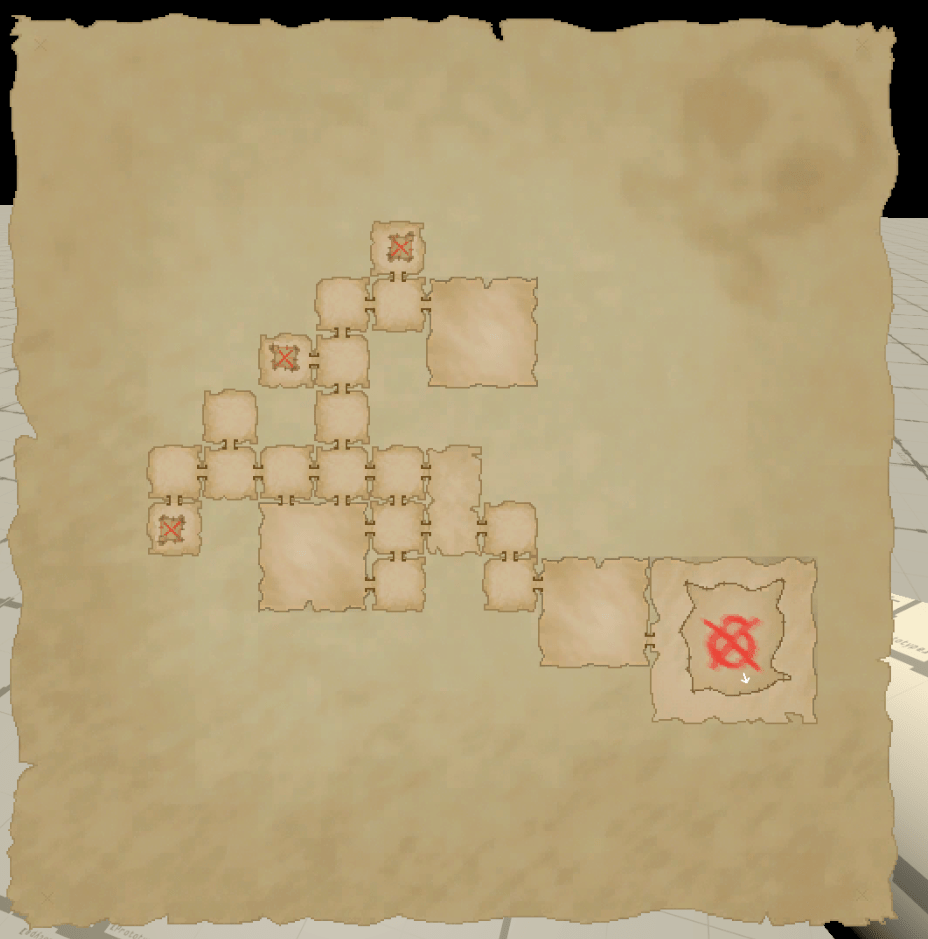
Changes to the map added semi-final sprites for the rooms and a large whole level map. Theres not much to talk about in this section (thankfully). Toggling the large map involves moving the minimap camera to a pre-determined location. This location is set at the midpoint between the 2 furthest rooms. This ensures that, even if the random walk walks in 1 direction, the map will be centred. The style of the sprites is final, but I will probably tinker with the details or colours of it.
The aesthetic I’m going for is someone sticking old pieces of paper to an older piece of paper/hide as they chart their path. Special rooms such as the boss room and the treasure room have an additional patch attached onto the paper. This is reminiscent of old sailor maps which often had corrections applied by gluing pieces of parchment overtop the already existing map. Below is a fully charted map.
Cross Sessions Saving and Run Ending
Now the game has persistable variables. This comes using unity’s built in PlayerPrefs system. This works for simple variables which is all I require it for currently. When I eventually need more complicated saves I’ll look into custom methods. At the end of a run the player’s permanent gold is calculated (as described last week). This value is added to the PlayerPrefs permanent gold counter. Alongside this, wins and losses are counted here. Upon returning to the Hub the permanent gold value is displayed in the same place as the run’s gold value for UI simplicity. There is currently no use for gold.
Upon killing the boss an item will spawn with the ability to transition to another level (implemented but nowhere to go) end the run (normal) or give a special interaction.
The 4th and final saved variable are whether or not the player has found the new NPC hat.
New NPC – Hat
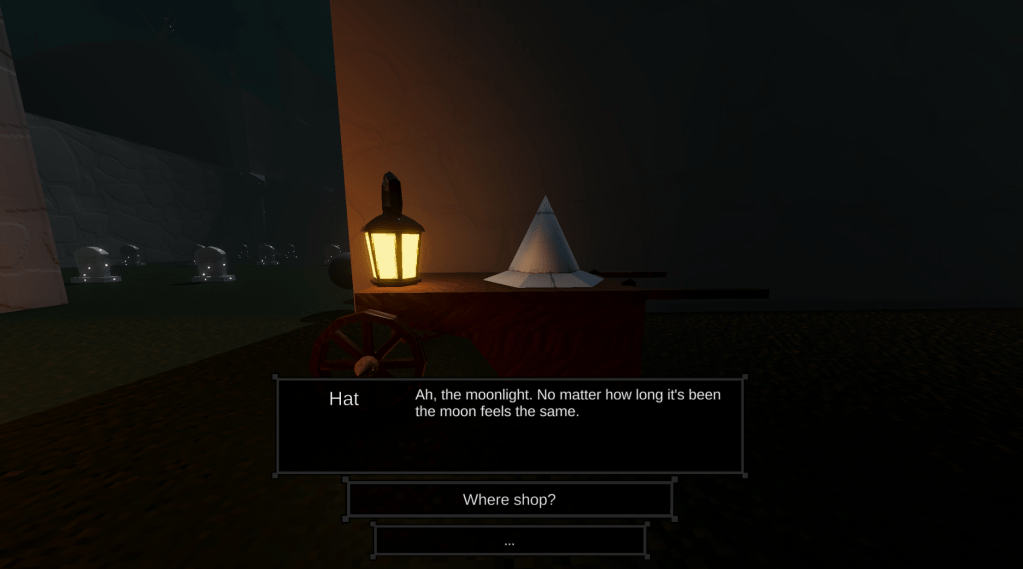
When the player kills the boss for the first time a different run ending object will spawn. Upon breaking into it (the same way the player breaks into item chests) and NPC will spawn. The NPC, Hat, will introduce itself, give some vague exposition and ask the player to end the run. Not doing so will continue the run, allowing the player to continue exploring (if they haven’t fully expored already). Re-initiating dialogue will skip the initial exposition and just allow ending the run.
Ending the run will flip a saved value which will cause Hat to spawn at the Hub. He will be positioned on top of a cart with a lantern. If spoken to, he talks about vague lore stuff and says he’s still setting up his shop. This is because I haven’t implemented the shop. I do like the dialogue so I may add a second condition to opening the shop.
Unlike last week’s Vaultkeeper, I have adjusted the dialogue system to allow for completely separate dialogue trees.
Upon the arrival of Hat. The Vaultkeeper also utilises the modified dialogue system to use a different dialogue tree questioning the arrival of the new NPC.
Projectile System
I had been putting off creating this as I believed it to be unnecessary for the demo. However, with playtesting the game felt dull without any projectiles to dodge.
Although I only need simple projectiles I went ahead and created a highly flexible projectile system. Projectiles can be either side with the player or the enemy. Projectiles have modifiers that allow piercing, gravity or bouncing.
The bouncing system works but is a little bugged right now with how it counts bounces, but this isn’t an issue for now and it should be a simple fix when it does become an issue.
Projectiles data is stored on scriptable objects holding the information on the aforementioned modifiers as well as more standard variables like speed and base speed. This scriptable object is used by a projectile manager which allows it to set up its rigid body properly. Any object can call a projectile using the object pooler giving it a spawn location and direction. Originally, I had only planned to make a simple projectile for an enemy to launch. However, due to the inherent randomness of enemy AI this would not be efficient testing. So, I had to make a weapon to launch projectiles in a more controlled manner. And if I already have to make a weapon that launches projectiles I may as well set up projectile weapons properly.
Setting up projectile weapons has more of a hassle than I imagined. My currently hitscan weapon system involves a layered stack of inherited script in the order of WeaponCore -> RangedWeaponBase -> HitscanWeaponBase -> [individual weapon script].
Sensibly I could branch from ranged weapon base into projectile weapon base causing a fork. However, due to not knowing exactly what projectiles would look like back when I set up hitscan there was a lot of issues. Some of the variables used exclusively by hitscan weapons were on the RangedWeaponBase. Solving this involved transitioning these onto HitscanWeaponBase as well as overriding the Establish function which draws from the scriptable object onto more concise variables. This also involved adding a Ranged Weapon scaffolding scriptable object for the hitscan weapon’s scriptable object to inherit from. Doing so also meant the hitscan weapon had to type cast its scriptable object on its own override Establish.
The projectiles themselves use a rigidbody to control movement as well as a trigger to detect whether they should do anything. A majority of the time they have no collision of their own so they cannot be affected by normal physics. The only exception to this is when they bounce. Only when touching an allowed surface their collision enables. Using a physics material to control bounciness they bounce, decrement the bounce count variable, and upon leaving the contact, disable their collision again. This is where the issue arises as I’ll need to update what counts as an allowed surface. However, their current use case doesn’t need this so its fine. Projectiles will always turn to face their movement direction or now.
Enemy Changes
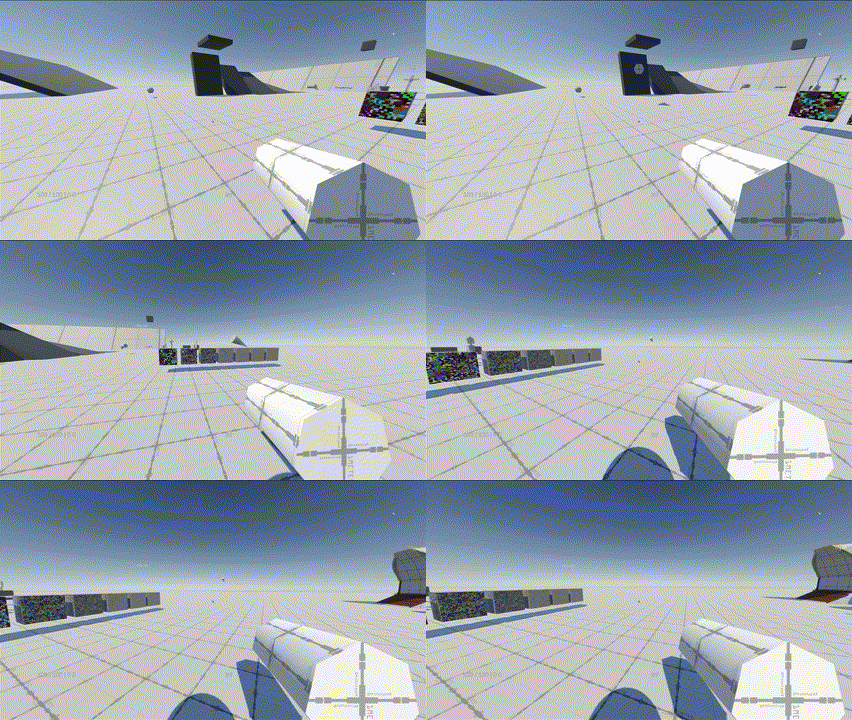
Enemies now have glowing red eyes. This is meaningless but kind of neat. I assume this will become ever more relevant when tiles get visual upgrades though. As being able to determine gameplay element from environment is extremely important. The eyes consist of 2 sphere with a red emissive material on them, which triggers the bloom post processing. These orbs also have trail renderers to leave streaks in the air as they move. This also looks neat, especially if their ragdoll does anything interesting.
I allowed the barrel kin to fire projectiles toward the player. Originally the ability to call projectiles was placed on their state machine. As there was no animation at this moment, I set the orbs to do a small 20 damage (5 shots to kill). The state to fire these was attached to the Rough Chase state. This inherently gave a minimum and maximum range to these shots. Ensuring the player wouldn’t be jump scared by a 20-damage stab at point blank range. However much of this changed when an animation was implemented.
I moved the projectile calling system to the base enemy attacks script which also housed the functions for melee attacks. This also caused the creation of a new barrel kin specific script inheriting from this. This script held the charging and firing functions as well as reference to all the necessary aesthetic changes. These scripts were eventually to be called by animation events.
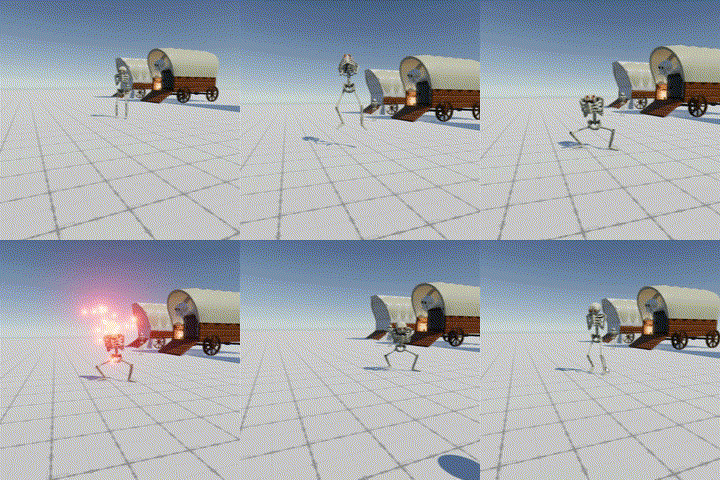
I planned to re-do a good sum of the animations of the barrel kin. However, I discovered this is a very laborious process. As I only needed to add 1 animation, I decided to forgo this for now. The animation I added was to accompany their new projectile attack. Animation is kind of fun and goofy because the enemy hops into position to charge it. The timings on all the aesthetic features were informed by the animation. The animation contains 2 events, 1 to charge and 1 to fire. In truth the fire function is completely independent of the charge function. Due to the choreographed nature of the attack I’ve decided to up the damage to 25 (4 to kill). Due to the overwhelming choreographing of the attack, it would be possible to up the damage even further but because this is a generic enemy some large rooms will cause a lot of projectiles to be shot at the player.
Below is the animation.
Lighting
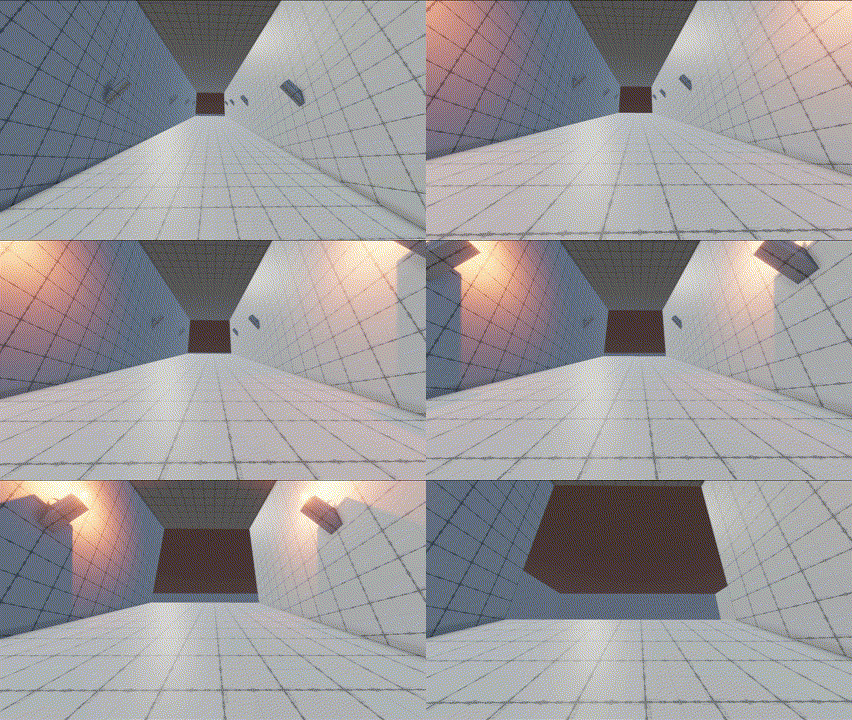
The final thing I did this week was implement the dynamic lighting system. Due to Unity’s URP, there is a maximum of 8 real time lights allowed per object. This means great care needs to be put into a dynamic lighting system. The real time lighting exists solely to light gameplay elements such as the player viewmodel and enemies. This is because the tiles themselves will use a baked lighting system.
The dynamic lighting system comes in 2 forms. Standard room lighting and custom lighting. Both use the same core principle. Standard room lighting makes use of the combat zone collider to enable and disable lights. The custom lighting uses its own custom colliders to do so. I’m currently making use of the custom lighting to environmentally tell the player that they are approaching a boss room. In this greybox if the player walks up a staircase where torches turn on as they pass them. The player should know something is up.
Although similar in system the use case is entirely opposite. Standard room lighting should be invisible. The player shouldn’t even know it exists. This is because the lighting will not impact the environment. Custom lighting exists to be seen, to inform the player about something.
On the side of this screen space ambient occlusion (SSAO) was added, it looks alright, I might tinker with it in the future though.
What’s Next?
Items lots of items. I plan on making many more possible builds. Currently the only build is an airborne build, I want to expand that and add some additional variations in play.
On top of this I want to add the sensitivity slider which has saved data.
I’ll probably think of a lot more things to do over the course of the week as this week basically finished by backlog of “things to worry about in the future”.
 James Mitchell
Leave a comment