New this week
This week I implemented the combat doors and added a prototype weapon UI. The weapon UI visuals need to go on pause because I intend on using some sort of visual indication for weapons which don’t exist yet.
Combat Doors
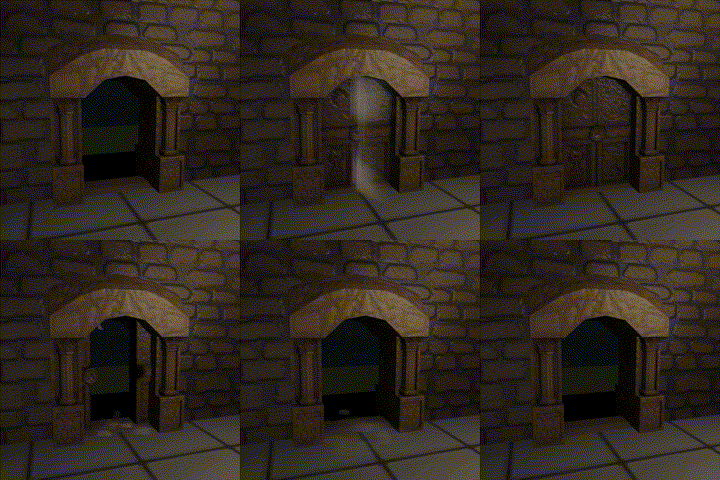
The doors themselves are double sliding doors that disappear entirely into the frame. This is to enforce visual clarity and reduce clutter. The visuals themselves are independent of the hitboxes. This not only prevents people from leaving rooms improperly but also doesn’t hinder movement focused gameplay that may try to exit a room as fast as possible. The goal of the doors is to be a physical indication of the state of room while not hindering gameplay in any capacity.
I added some particle effects to increase the visual interest of the doors. This has caused a fortunate side effect that upon entering the room the player can roughly tell where the other doors are. Below are the animations for the door.
UI Weapon Switch
I created a weapon switch UI. As there are a possible total of 10 weapon slots the graphics had to indicate that. I took inspiration from the half-life style of weapon swapping UI but heavily watered it down for my purposes. In the current form unselected but equipped weapons are marked with their appropriate swap hotkey. Empty weapon slots are just marked with empty. The currently equipped weapon expands out to show its name. Although 10 weapon slots are possible reaching that is unlikely, so the system also accounts for only displays the current amount of weapon slots. Another alternative would be to have all slots but greying out the locked ones. However, this would be too visually cluttering.
On the side note I’ve also added the ability to change weapon with the scroll wheel.

What’s next?
Next is to start working on weapon models and animations. This comes with adding the icons for the weapons which will be used in the complete weapon swap UI.
 James Mitchell
Leave a comment